
Adding Main Content in Portal 10.1
Lawson Portal 10.1 Series – Adding Main Content in Portal 10.1
We’ve covered three articles in the Lawson Portal 10.1 series: how to personalize the theme and portal elements of your Lawson Portal, as well as how to add personal bookmarks on the page. In the next part of the series, we will go over how to add main content.
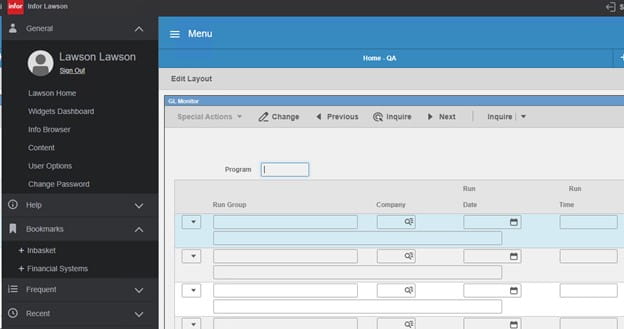
In Lawson Portal 10.1, adding content to your main screen is very similar to previous versions. First, open the left-hand menu and go to General > Content.
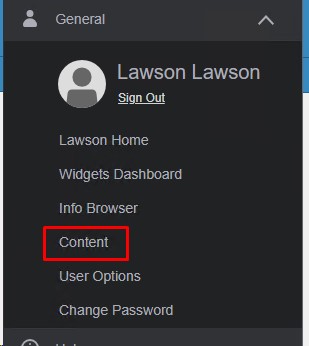
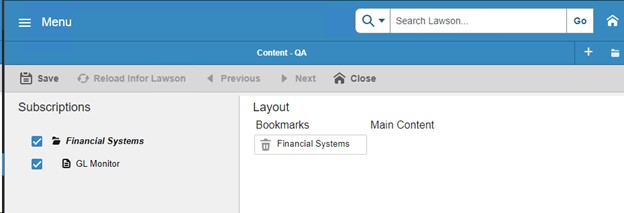
Expand the bookmark that has the you wish to add (on the left). Double-click the subordinate (under the bookmark) that you wish to see on the main content page. The item will be moved to the right side under Main Content after it is added. If you don’t see the bookmark you are looking for, check with your administrator to make sure you have access.
Before:
After:
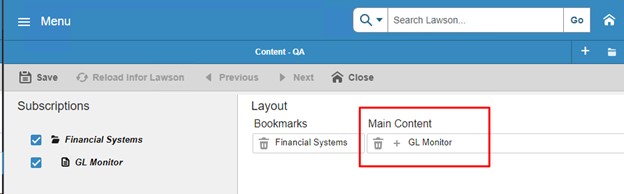
Click Save and Reload Infor Lawson. Now your homepage will contain the content you selected.
Retiring Lawson, PeopleSoft, or Oracle? APIX archives the entire application — every table, every year, attachments and security included — into your own AWS account in about 30 days, so you can decommission the legacy system and keep full access to the history.


Leave a Reply
Want to join the discussion?Feel free to contribute!