
Creating custom IPA triggers using 4GL
With Infor Process Automation, there are several ways to trigger a Process. This article will discuss how to trigger a custom process using 4GL.
First, create your Process. Test it and upload it to the Process Server.
Next, in IPA Rich Client (or the LPA Admin tool), you must create a Service Definition (Process Server Administrator > Administration > Scheduling > By Service Definition) and attach a Process to it. There, you will configure any variables that should be passed to the process.
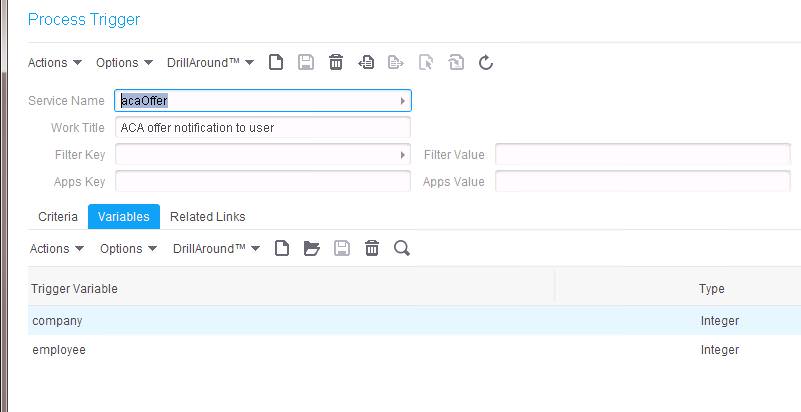
Now, let’s create the trigger in the 4GL program. This will be either a custom program your organization has created, or an existing Lawson form.
The first step is to initialize the WF SERVICE.
INITIALIZE WFAPI-INPUT
INITIALIZE WFAPI-OUTPUT
MOVE <serviceNameString> TO WFAPI-I-SERVICE
PERFORM 1000-WF-SERVICE
***Verify that the return code != 0 (anything other than 0 indicates error)
IF (WFAPI-O-RETURN-CODE NOT = ZEROS)
GO TO 600-END
Next, create the Work Unit
MOVE WFAPI-O-SERVICE TO WFAPI-I-SERVICE
MOVE <workTitleString> to WFAPI-I-WORK-TITLE
INITIALIZE WFAPI-OUTPUT
PERFORM 1000-WF-CREATE-SETUP
Now, populate your variables. You can have an unlimited number of variables per Service Definition, but you must populate them in groups of 10 (i.e. perform the 1000-WF-ADD-VAR-SETUP for each group of 10)
INITIALIZE WFAPI-INPUT
MOVE WFAPI-O-WORKUNIT TO WFAPI-I-WORKUNIT
MOVE “company” TO WFAPI-I-VARIABLE-NAME (1)
MOVE HR11F1-EMP-COMPANY TO WFAPI-I-VARIABLE-VAL (1)
MOVE “I” TO WFAPI-I-VARIABLE-TYPE (1)
MOVE “employee” TO WFAPI-I-VARIABLE-NAME (2)
MOVE HR11F1-EMP-EMPLOYEE TO WFAPI-I-VARIABLE-VAL (2)
MOVE “I” TO WFAPI-I-VARIABLE-TYPE (2)
INITIALIZE WFAPI-OUTPUT
PERFORM 1000-WF-ADD-VAR-SETUP
Finally, release the Work Unit
INITIALIZE WFAPI-INPUT
MOVE WFAPI-O-WORKUNIT TO WFAPI-I-WORKUNIT
INITIALIZE WFAPI-OUTPUT
PERFORM 1000-WF-RELEASE-SETUP
Nogalis would love to assist with all your IPA needs! We have some great resources on hand who can provide managed services of your system, training, and project work. Check out our managed services program today!
Retiring Lawson, PeopleSoft, or Oracle? APIX archives the entire application — every table, every year, attachments and security included — into your own AWS account in about 30 days, so you can decommission the legacy system and keep full access to the history.

