
Program Error “netexpress not found”
In a new install of Lawson, we recently had an issue running forms (inquire, previous, add, etc). The program would hang and eventually show an IOS error message. The job log said that lacobrts failed due to a timeout, but latm.log presented a more detailed error.
Thu Jun 17 18:55:55 2021: latm (jeeStartComponent): netexpress not found
Thu Jun 17 18:59:21 2021: latm: Monitoring turned on
Thu Jun 17 19:01:16 2021: Timeout on opening application, removing application
Thu Jun 17 19:01:16 2021: Pid=-1, Program Code=CU01 DataArea/DataID PROD
Thu Jun 17 19:01:16 2021: Possible causes: Insufficient NetExpress licenses or
Thu Jun 17 19:01:16 2021: not enough database users configured in ladb.cfg.
Thu Jun 17 19:01:16 2021: latm (PrcTPCrash): Received death notification of lacobrts, Uid=-1, Pid=-1
Thu Jun 17 19:01:16 2021: Program Code = CU01 , DataArea/DataID = PROD
Thu Jun 17 19:01:16 2021: ERROR: Exited with error code 0
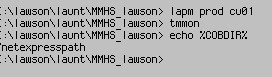
The Microfocus COBOL licenses were definitely not an issue, so we started trying to track down the “netexpress not found” error. Running “echo %COBDIR%” in LID revealed that the COBDIR environment variable was not pointing to the correct location.
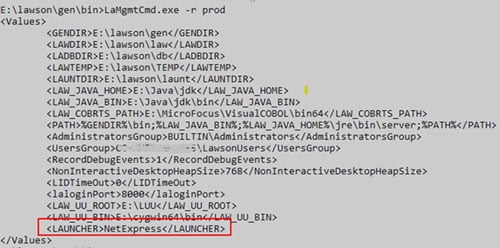
This variable is set by the system, and is not something you can override in the Windows system environment variables. After some troubleshooting, we discovered that the Lawson system value “LAUNCHER” was not correct. We ran the command LaMgmtCmd -r <envname>, which showed the LAUNCHER value as “NetExpress”. We compared this to another (healthy) environment that showed the LAUNCHER value as “run.exe”.
Some of these values can be modified using laconfig, but this specific value had to be updated using the update option on the LaMgmtCmd command. First, we created an XML file with all the values (including the correct launcher), then ran LaMgmtCmd -u <envname> <filename>.
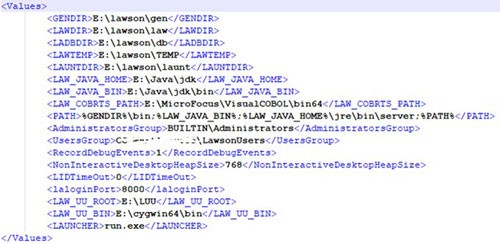
After the update, we rebooted the system, and ran lamgmtcmd -r <envname> to validate.
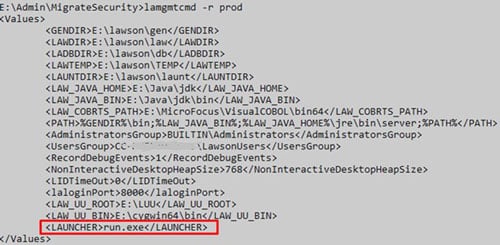
The value was correct, and we were able to start using the forms again.
Retiring Lawson, PeopleSoft, or Oracle? APIX archives the entire application — every table, every year, attachments and security included — into your own AWS account in about 30 days, so you can decommission the legacy system and keep full access to the history.

