
Convert LBI to SSL
To convert LBI to use https, the first step is to make sure that you have valid PKCS 12 certificates installed in the Personal and Trusted Root stores on your LBI server. Export your certificate (or have your system admin do it for you) with the public key and private key, and with the full certificate chain. During the export, provide a password for the certs.
In WebSphere on your LBI server, go to Security > SSL certificate and key management. Select Key stores and certificates > NodeDefaultKeyStore > Personal certificates. Replace the default certificate with the cert that you just exported. Do the same for the CellDefaultKeyStore (if applicable). Next, under Key stores and certificates again, select the KeyStore and TrustStore, and select “Exchange Signers…”
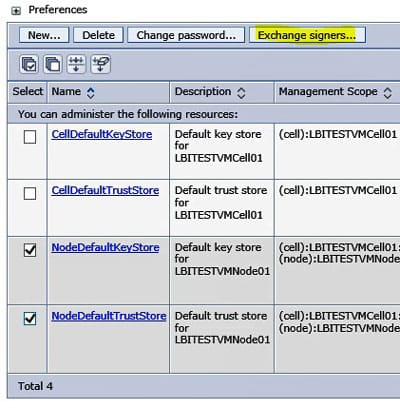
Add your new certificate from the KeyStore to the TrustStore and Apply. Save the changes. No need to restart your application server yet, we will do that in a bit.
Make sure that your Virtual Hosts contain an alias for the secure port you plan to use. Note that this port must be the WC_defaulthost_secure port under Ports on your Application Server.
In LSF, update your DSP service for LBI to use the new service URL. The service should be set to “Use HTTPS always” and the new service URL should be “https://lbiserver.company.com:port/sso/SSOServlet.
Restart your LSF application server and your LBI application server.
Open your LBI install validator with https://lbiserver.company.com:secureport/efs/InstallValidator and make sure the system URL is set to the new secure URL. Submit the new URL. If the certificates are not valid, you will receive an error message indicating as such. Otherwise, there should be no failed tests.
Retiring Lawson, PeopleSoft, or Oracle? APIX archives the entire application — every table, every year, attachments and security included — into your own AWS account in about 30 days, so you can decommission the legacy system and keep full access to the history.

