
844-NOGALIS (844-664-2547)
Nogalis, Inc.
  • Link to Facebook
  • Link to X
  • Link to LinkedIn
  • Link to Mail
  • Company
    • News, Events and Articles
    • About Us
  • Products
    • Infor Lawson Data Archive
    • PeopleSoft Data Archive
    • Oracle Data Archive
  • Services
    • Infor Lawson Support
    • Infor Lawson / CloudSuite Consulting
  • Education & Training
  • Support
  • Contact Us
  • Click to open the search input field Click to open the search input field Search
  • Menu Menu

How to Backup LDAP in Lawson v10

Articles, News

You’re about to make some changes but want to create a backup for LDAP just in case there are any mistakes.

Let’s get started:

First thing we need to do is remote into the v10 server you want to backup LDAP.

Once in, create a “temp” directory somewhere in Lawson or lsfprod. For us, this will be Lawson\temp\<todays date>

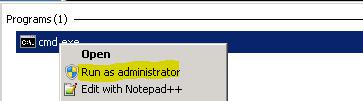
Run CMD.exe as administrator:
How to Backup LDAP in v10 Lawson-1

Switch to drive Lawson is on, for us this is the D:\

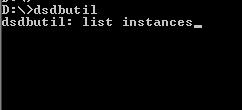
Now type dsdbutil and hit enter, then type list instances and hit enter to get a list of instances.
How to Backup LDAP in v10 Lawson-2

Once you know what instance you want, type Activate instance <Instance Name>

This will set the instance name to backup.

Type ifm and press enter. To create the backup, type create full <directory output name>

Make sure there are no spaces in your directory output name.

Example:

create full D:\lawson\temp\20160531

Now check that directory and there should be a .dit file.

To restore an LDAP backup, turn off IBM Services in the correct order.

This should be:

  1. IBM Websphere app. server v8.5 Infot10Prod-app.
  2. IBM Websphere app. server v8.5 Node Agent
  3. IBM Cellmanager02

Turn off Prodinfor10ADLDS service (or similar name)

Then go to the <Drive>\Microsoft ADAM\ProdInfor10ADLDS\data directory and replace the .dit file with your backup (back up the existing .dit file just in case).

Start those IBM services back up in proper order along with Prodinfor10ADLDS.

Retiring Lawson, PeopleSoft, or Oracle? APIX archives the entire application — every table, every year, attachments and security included — into your own AWS account in about 30 days, so you can decommission the legacy system and keep full access to the history.

See how the APIX ERP archive works →

06/16/2016
Share this entry
  • Share on Facebook
  • Share on X
  • Share on WhatsApp
  • Share on LinkedIn
  • Share on Reddit
  • Share by Mail
https://www.nogalis.com/wp-content/uploads/2016/06/How-to-Backup-LDAP-in-Lawson-v10-1.jpg 646 711 Angeli Menta https://www.nogalis.com/wp-content/uploads/2013/04/logo-with-slogan-good.png Angeli Menta2016-06-16 16:08:232016-06-16 16:08:23How to Backup LDAP in Lawson v10

LEGACY ERP DATA ARCHIVE SOLUTION


Discover how our clients are leveraging AWS services to archive their Legacy ERP data and provide ubiquitous access to users via a light-weight, secure, and read-only web interface. Secure, Fast, Reliable, and Cost Effective. That is the promise of APIX. Follow the link below to find out more and book a discovery call with our data archive specialist.

BOOK DEMO

© Copyright - Nogalis, Inc. 2026
  • Legal
  • Privacy
  • Contact Us
Link to: Infor Partners With LearnQuest To Help Empower Users Through Global Training Initiative Link to: Infor Partners With LearnQuest To Help Empower Users Through Global Training Initiative Infor Partners With LearnQuest To Help Empower Users Through Global Training... Link to: Run a Process in IPA Link to: Run a Process in IPA Run a Process in IPA
Scroll to top Scroll to top Scroll to top