844-NOGALIS (844-664-2547)
Nogalis, Inc.
  • Link to Facebook
  • Link to X
  • Link to LinkedIn
  • Link to Mail
  • Company
    • News, Events and Articles
    • About Us
  • Products
    • Infor Lawson Data Archive
    • PeopleSoft Data Archive
    • Oracle Data Archive
  • Services
    • Infor Lawson Support
    • Infor Lawson / CloudSuite Consulting
  • Education & Training
  • Support
  • Contact Us
  • Click to open the search input field Click to open the search input field Search
  • Menu Menu

Tips for Formatting Excel CSV File from Infor Process Designer

Articles, News

When using IPDesigner to create a .csv file, we ran into four issues with the file output:
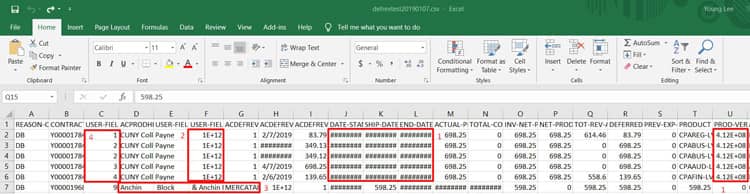
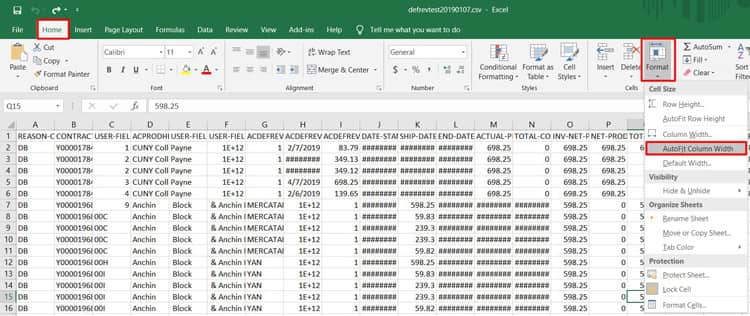
  1. Problem: Certain dates appear as ######## and certain numbers convert to scientific notation.
    Solution: Select entire page (ctrl + a) and click Home tab -> Format -> AutoFit Column Width
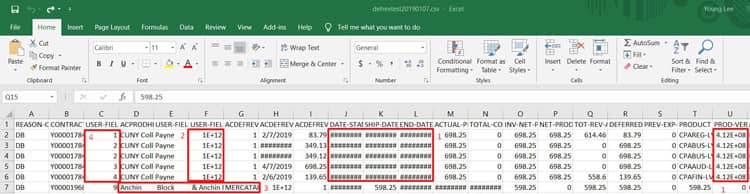
  2. Problem: Some numbers remain in scientific notation (ex: 1E+12) even after AutoFit Column Width
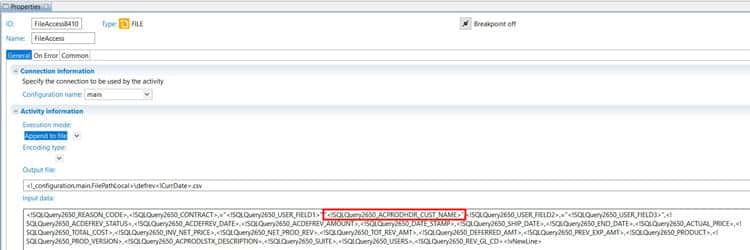
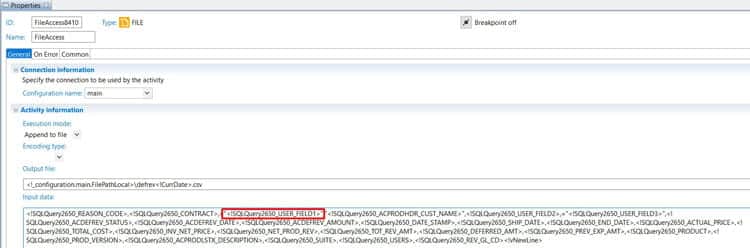
    Solution: In the FileAccess node, wrap the SQL query variable with quotation marks and put a “=” before it.
    (For example, <!SQLQuery2650_USER_FIELD1> would become =“<!SQLQuery2650_USER_FIELD1>”)


  3. Problem: Strings with commas get split at the comma in a csv file.
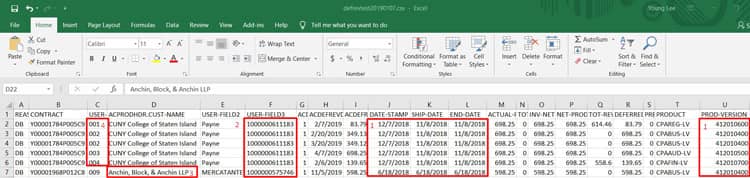
    Example in file: The value “Anchin, Block, & Anchin” is getting split into 3 columns as the flow is interpreting the commas as separators.

    Solution: In the FileAccess node, wrap the SQL query variable with quotation marks to include the commas as part of the string.

  4. Problem: Certain number values lose their zeroes at the front when written to csv format.
    Example in file: The values in column C should be 001, 002, etc. instead of 1,2.

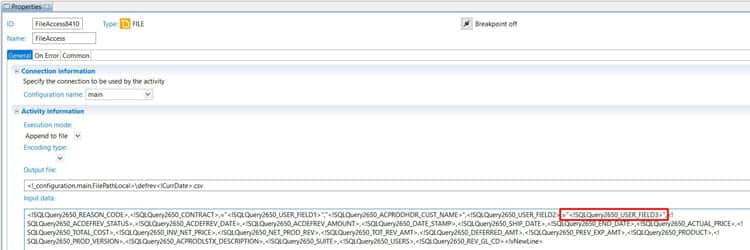
    Solution: In the FileAccess node, wrap the SQL query variable with quotation marks and put a “=” before it.
    (For example, <!SQLQuery2650_USER_FIELD3> would become =“<!SQLQuery2650_USER_FIELD3>”)

Before:
 

After:

Retiring Lawson, PeopleSoft, or Oracle? APIX archives the entire application — every table, every year, attachments and security included — into your own AWS account in about 30 days, so you can decommission the legacy system and keep full access to the history.

See how the APIX ERP archive works →

01/14/2019
Share this entry
  • Share on Facebook
  • Share on X
  • Share on WhatsApp
  • Share on LinkedIn
  • Share on Reddit
  • Share by Mail
https://www.nogalis.com/wp-content/uploads/2019/01/Tips-for-Formatting-Excel-CSV-File-from-Infor-Process-Designer.jpg 448 490 Angeli Menta https://www.nogalis.com/wp-content/uploads/2013/04/logo-with-slogan-good.png Angeli Menta2019-01-14 11:14:452019-02-23 11:09:59Tips for Formatting Excel CSV File from Infor Process Designer

LEGACY ERP DATA ARCHIVE SOLUTION


Discover how our clients are leveraging AWS services to archive their Legacy ERP data and provide ubiquitous access to users via a light-weight, secure, and read-only web interface. Secure, Fast, Reliable, and Cost Effective. That is the promise of APIX. Follow the link below to find out more and book a discovery call with our data archive specialist.

BOOK DEMO

© Copyright - Nogalis, Inc. 2026
  • Legal
  • Privacy
  • Contact Us
Link to: Liberty Speciality Steels Forges Ahead with Infor-First Policy Link to: Liberty Speciality Steels Forges Ahead with Infor-First Policy Liberty Speciality Steels Forges Ahead with Infor-First Policy Link to: Infor Retail Continues to Lead Retail Renaissance Link to: Infor Retail Continues to Lead Retail Renaissance Infor Retail Continues to Lead Retail Renaissance
Scroll to top Scroll to top Scroll to top