
844-NOGALIS (844-664-2547)
Nogalis, Inc.
  • Link to Facebook
  • Link to X
  • Link to LinkedIn
  • Link to Mail
  • Company
    • News, Events and Articles
    • About Us
  • Products
    • Infor Lawson Data Archive
    • PeopleSoft Data Archive
    • Oracle Data Archive
  • Services
    • Infor Lawson Support
    • Infor Lawson / CloudSuite Consulting
  • Education & Training
  • Support
  • Contact Us
  • Click to open the search input field Click to open the search input field Search
  • Menu Menu

How to test your SOAP Web Service calls using Postman

Articles, News
If you have worked with Web Services you can appreciate the ability to test your web service calls quickly and efficiently without a lot of programming. This is exactly what Postman was meant for. When you’re building SOAP service calls with IPA it can really make your life a lot easier if you have this particular skill and tool.
The secret sauce here is how you form the actual request. Just follow these steps:
  1. Set the method to POST
  2. Paste your URL in the “Enter request URL” field.
  3. Click the “Params” button and enter any parameters you may have. If you’re using IPA you probably don’t have any parameters to enter here and they’re all included in the body of your request.
  4. Click the Authorization tab and enter your authorization information. If you have user / password this is likely “Basic Authentication”
  5. Click the “Body” tab.
    • Select “raw”
    • From the drop-down on the right select “XML (text/xml)”
    • Paste your entire soap envelope into the body text area
  6. Click Send
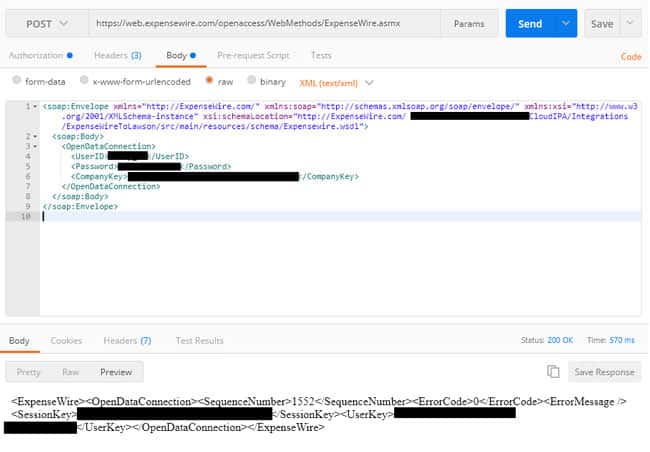
That should do it. You’l be able to see the status code (200 OK as shown below) and the time it takes to make the call (570 ms below)
Then in the body of your response you can see what the request returns which is pretty great to see if you’re trying to get a feel for what you’re dealing with.
Retiring Lawson, PeopleSoft, or Oracle? APIX archives the entire application — every table, every year, attachments and security included — into your own AWS account in about 30 days, so you can decommission the legacy system and keep full access to the history.

See how the APIX ERP archive works →

06/20/2018
Share this entry
  • Share on Facebook
  • Share on X
  • Share on WhatsApp
  • Share on LinkedIn
  • Share on Reddit
  • Share by Mail
https://www.nogalis.com/wp-content/uploads/2018/06/How-to-test-your-SOAP-Web-Service-calls-using-Postman.jpg 498 545 Angeli Menta https://www.nogalis.com/wp-content/uploads/2013/04/logo-with-slogan-good.png Angeli Menta2018-06-20 08:51:052019-05-08 15:30:49How to test your SOAP Web Service calls using Postman

LEGACY ERP DATA ARCHIVE SOLUTION


Discover how our clients are leveraging AWS services to archive their Legacy ERP data and provide ubiquitous access to users via a light-weight, secure, and read-only web interface. Secure, Fast, Reliable, and Cost Effective. That is the promise of APIX. Follow the link below to find out more and book a discovery call with our data archive specialist.

BOOK DEMO

© Copyright - Nogalis, Inc. 2026
  • Legal
  • Privacy
  • Contact Us
Link to: 5 Reasons Why Your CRM And ERP Systems Should Talk Link to: 5 Reasons Why Your CRM And ERP Systems Should Talk 5 Reasons Why Your CRM And ERP Systems Should Talk Link to: How technology is changing in the education sector Link to: How technology is changing in the education sector How technology is changing in the education sector
Scroll to top Scroll to top Scroll to top