
844-NOGALIS (844-664-2547)
Nogalis, Inc.
  • Link to Facebook
  • Link to X
  • Link to LinkedIn
  • Link to Mail
  • Company
    • News, Events and Articles
    • About Us
  • Products
    • Infor Lawson Data Archive
    • PeopleSoft Data Archive
    • Oracle Data Archive
  • Services
    • Infor Lawson Support
    • Infor Lawson / CloudSuite Consulting
  • Education & Training
  • Support
  • Contact Us
  • Click to open the search input field Click to open the search input field Search
  • Menu Menu

Purging Benefits Data

Articles, News

Every time an employee makes a benefits change, a new record is stored in the benefits table.  Additionally, a new record is stored in the employee’s deduction master table for each deduction related to that benefit.  If these records are allowed to accumulate unchecked, this can slow down payroll processing and even cause errors.  The larger the benefits and deductions table become, the slower payroll batch jobs will run.  These batch jobs, such as PR140, loop through each record in these benefits and deductions tables so that the correct deductions are applied.  Some of these batch jobs have a limit of the number of records allowed, so if an employee has deductions that exceed that limit, the job will error out.  Also, traversing through these records can greatly slow down processing.

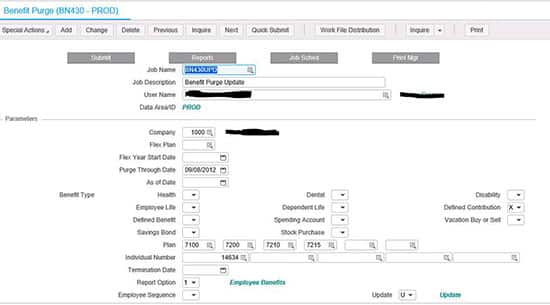
To help alleviate these issues, we recommend running the BN430 benefits purge program periodically.  When you are processing payroll, if you see an error similar to “26 20591 PRDED-DED-TABLE must be increased; Cur size 0500”, chances are you have an employee with too many benefits changes, and need to run the BN430.  But, before you receive this error, you should make the benefits purge part of a normal maintenance process.  Ideally, payroll users would make this part of the payroll process each pay period, and choose a “Purge Through Date” corresponding to your company’s record retention period.Purging-Benefits-Data
Retiring Lawson, PeopleSoft, or Oracle? APIX archives the entire application — every table, every year, attachments and security included — into your own AWS account in about 30 days, so you can decommission the legacy system and keep full access to the history.

See how the APIX ERP archive works →

10/04/2016
Share this entry
  • Share on Facebook
  • Share on X
  • Share on WhatsApp
  • Share on LinkedIn
  • Share on Reddit
  • Share by Mail
https://www.nogalis.com/wp-content/uploads/2016/10/Purging-Benefits-Data.jpg 545 599 Angeli Menta https://www.nogalis.com/wp-content/uploads/2013/04/logo-with-slogan-good.png Angeli Menta2016-10-04 14:37:262016-10-04 14:37:26Purging Benefits Data

LEGACY ERP DATA ARCHIVE SOLUTION


Discover how our clients are leveraging AWS services to archive their Legacy ERP data and provide ubiquitous access to users via a light-weight, secure, and read-only web interface. Secure, Fast, Reliable, and Cost Effective. That is the promise of APIX. Follow the link below to find out more and book a discovery call with our data archive specialist.

BOOK DEMO

© Copyright - Nogalis, Inc. 2026
  • Legal
  • Privacy
  • Contact Us
Link to: Restaurant Execs Invest in Technology Link to: Restaurant Execs Invest in Technology Restaurant Execs Invest in Technology Link to: Infor Learning Optimization Now Available Link to: Infor Learning Optimization Now Available Infor Learning Optimization Now Available
Scroll to top Scroll to top Scroll to top