844-NOGALIS (844-664-2547)
Nogalis, Inc.
  • Link to Facebook
  • Link to X
  • Link to LinkedIn
  • Link to Mail
  • Company
    • News, Events and Articles
    • About Us
  • Products
    • Infor Lawson Data Archive
    • PeopleSoft Data Archive
    • Oracle Data Archive
  • Services
    • Infor Lawson Support
    • Infor Lawson / CloudSuite Consulting
  • Education & Training
  • Support
  • Contact Us
  • Click to open the search input field Click to open the search input field Search
  • Menu Menu

Scan for Files in IPA

Articles, News
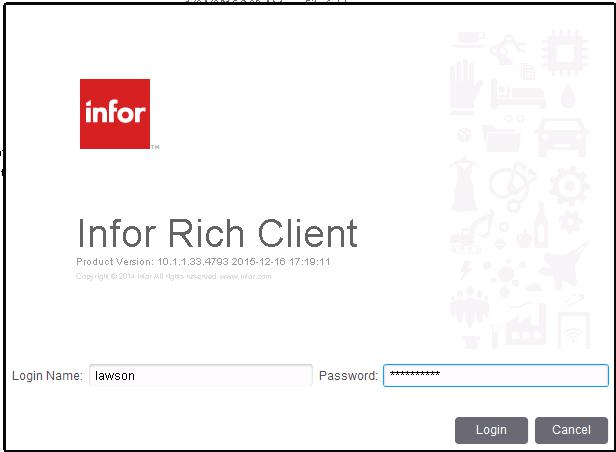
  1. Open Infor Rich Client Run A Process-1
  2. At the login prompt, enter the Lawson username and passwordRun A Process-2
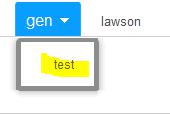
  3. The canvas is now open. Look in the upper left corner and make sure you are pointing to the prod or test data area (not gen) Run A Process-3
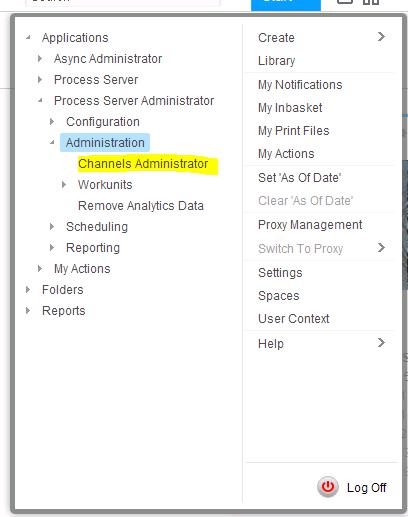
  4. In the upper right corner, click “Start > Applications > Process Server Administrator > Administration > Channels Administrator”Scan for Files in IPA-1
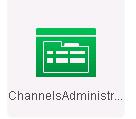
    1. At this point, you can click, HOLD, and drag the “Channels Administrator” link to the canvas. That way, it will create a shortcut on the canvas. Create a File Channel in IPA-4
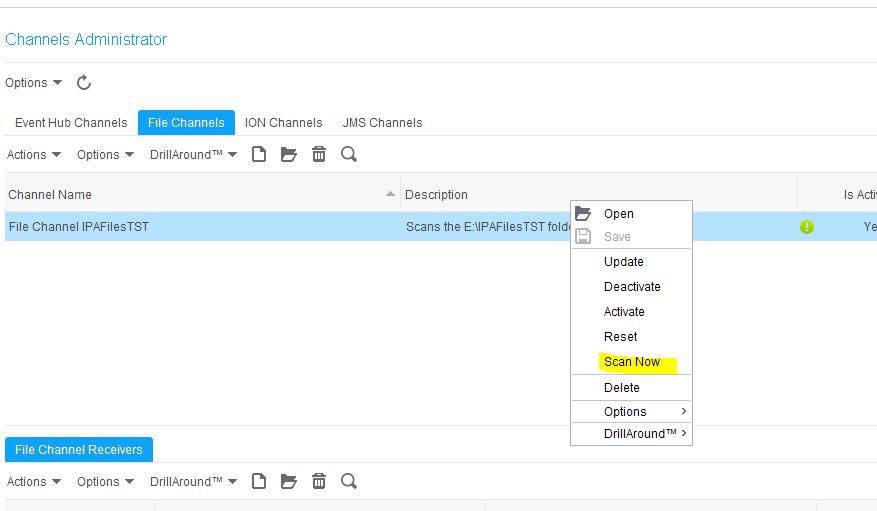
  5. Once you are in Channels Administrator, click on the File Channels tab, and you should see a list of File Channels that have been set up
  6. Locate the channel for which you wish to scan
  7. Right click on the channel and select “Scan Now”Scan for Files in IPA-2
  1. This will scan the file configured in the Channels Administrator, and kick off any processes that use the files in that directory (the processes are configured in the File Channel Receivers section)


Retiring Lawson, PeopleSoft, or Oracle? APIX archives the entire application — every table, every year, attachments and security included — into your own AWS account in about 30 days, so you can decommission the legacy system and keep full access to the history.

See how the APIX ERP archive works →

07/27/2016
Share this entry
  • Share on Facebook
  • Share on X
  • Share on WhatsApp
  • Share on LinkedIn
  • Share on Reddit
  • Share by Mail
https://www.nogalis.com/wp-content/uploads/2016/07/Scan-for-Files-in-IPA.jpg 665 732 Angeli Menta https://www.nogalis.com/wp-content/uploads/2013/04/logo-with-slogan-good.png Angeli Menta2016-07-27 13:50:262016-07-27 13:50:26Scan for Files in IPA

LEGACY ERP DATA ARCHIVE SOLUTION


Discover how our clients are leveraging AWS services to archive their Legacy ERP data and provide ubiquitous access to users via a light-weight, secure, and read-only web interface. Secure, Fast, Reliable, and Cost Effective. That is the promise of APIX. Follow the link below to find out more and book a discovery call with our data archive specialist.

BOOK DEMO

© Copyright - Nogalis, Inc. 2026
  • Legal
  • Privacy
  • Contact Us
Link to: Troubleshooting BSI Database Connection during Install Link to: Troubleshooting BSI Database Connection during Install Troubleshooting BSI Database Connection during Install Link to: Scheduling a Process in IPA Link to: Scheduling a Process in IPA Scheduling a Process in IPA
Scroll to top Scroll to top Scroll to top