
844-NOGALIS (844-664-2547)
Nogalis, Inc.
  • Link to Facebook
  • Link to X
  • Link to LinkedIn
  • Link to Mail
  • Company
    • News, Events and Articles
    • About Us
  • Products
    • Infor Lawson Data Archive
    • PeopleSoft Data Archive
    • Oracle Data Archive
  • Services
    • Infor Lawson Support
    • Infor Lawson / CloudSuite Consulting
  • Education & Training
  • Support
  • Contact Us
  • Click to open the search input field Click to open the search input field Search
  • Menu Menu

How to Setup Your 2012 Server for Easy Administration

Articles, News
Administering Lawson on Windows has traditionally required using the basic toolset within windows to get things done. With Windows 2012 it seems like some of the very basic tools users are used to are hidden away and require several extra clicks to get to. Here are some quick ways to make Windows 2012 easier to deal with:
Method 1
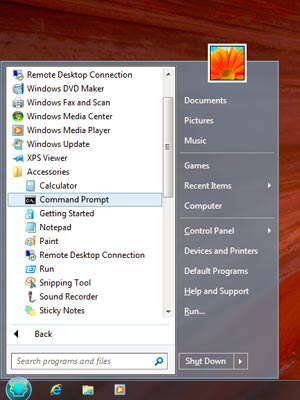
Install a 3rd party tool called Classic Shell found here: https://www.classicshell.net
This is by far the easiest way to get Windows 2012 to act more like Windows 2008.
How-to-Setup-Your-2012-Server-for-Easy-Administration_1
Method 2
Since installing 3rd party applications like Classic Shell is not going to appeal to every client. Here’s a quick way to get at least your programs menu back without the help of any 3rd party applications:
Steps (4 total)
  1. Display “Hidden items” on your C: Drive – Open File Explorer and browse to your C: Drive. On the View tab, check the “Hidden items” checkbox.
  2. Add a New Toolbar on your Taskbar. – Right-click on a blank area of your Taskbar and select Toolbars > New Toolbars.
  3. Browse to the Start Menu\Programs folder. – In the New Toolbar dialog box, browse to the “C:\Program Data\Microsoft\Windows\Start Menu\Programs” folder.
  4. Click the “Select Folder” button. – Click the “Select Folder” button to add the new Toolbar to your Taskbar.

Retiring Lawson, PeopleSoft, or Oracle? APIX archives the entire application — every table, every year, attachments and security included — into your own AWS account in about 30 days, so you can decommission the legacy system and keep full access to the history.

See how the APIX ERP archive works →

04/25/2016
Share this entry
  • Share on Facebook
  • Share on X
  • Share on WhatsApp
  • Share on LinkedIn
  • Share on Reddit
  • Share by Mail
https://www.nogalis.com/wp-content/uploads/2016/04/How-to-Setup-Your-2012-Server-for-Easy-Administration-1.jpg 434 475 Angeli Menta https://www.nogalis.com/wp-content/uploads/2013/04/logo-with-slogan-good.png Angeli Menta2016-04-25 13:30:512016-06-02 15:16:58How to Setup Your 2012 Server for Easy Administration

LEGACY ERP DATA ARCHIVE SOLUTION


Discover how our clients are leveraging AWS services to archive their Legacy ERP data and provide ubiquitous access to users via a light-weight, secure, and read-only web interface. Secure, Fast, Reliable, and Cost Effective. That is the promise of APIX. Follow the link below to find out more and book a discovery call with our data archive specialist.

BOOK DEMO

© Copyright - Nogalis, Inc. 2026
  • Legal
  • Privacy
  • Contact Us
Link to: How to Setup Dependencies for Lawson Services Link to: How to Setup Dependencies for Lawson Services How to Setup Dependencies for Lawson Services Link to: How to Fix a Scheduled LBI Report That Didn’t Run Properly Link to: How to Fix a Scheduled LBI Report That Didn’t Run Properly How to Fix a Scheduled LBI Report That Didn’t Run Properly
Scroll to top Scroll to top Scroll to top