
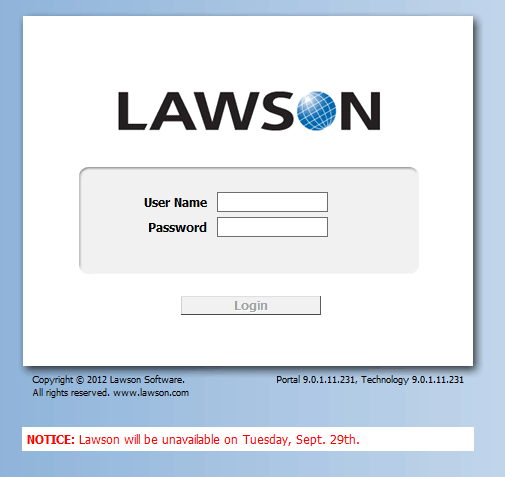
How to add a welcome message or notification to the portal login page
Let’s say you want to display a message on the login page for your users. It’s possible you just want to let the know about an upcoming outage, possibly about benefits enrollment dates, or just to tell them about a new event. There’s really no easy way to do that in Portal now. But with a little hacking you can get a really nice message displayed.
You’ll first want to go to the sso.war folder of your IBM profile where you login.htm resides. This can take a few minutes to locate as the Websphere directory structure is notoriously complex. Here’s an example from a client:
D:\IBM\WebSphere\AppServer\profiles\AppSrv01\installedApps\prodCell01\LawsonSecurity.ear\sso.war
Once there:
- Open the login.html file in your favorite text editor (I like editplus)
- Find the bottom portion of the login box. It’s just below the div that contains the “All rights reserved” message.
- Insert your own div there that contains your message and save. Here’s an example of mine:
<div style="position:absolute;left:5px;top:416px;width:452px;color=#FF0000;background:#FFFFFF;padding:5px" dir="ltr"><b>NOTICE: </b>Lawson will be unavailable on Tuesday, Sept. 29th.</div>
Keep in mind, each time you upgrade portal this message will likely disappear.
Retiring Lawson, PeopleSoft, or Oracle? APIX archives the entire application — every table, every year, attachments and security included — into your own AWS account in about 30 days, so you can decommission the legacy system and keep full access to the history.

