
Lawson Expense Management XM User Profile Getting Overwritten
Problem: An XM User Profile is getting overwritten.
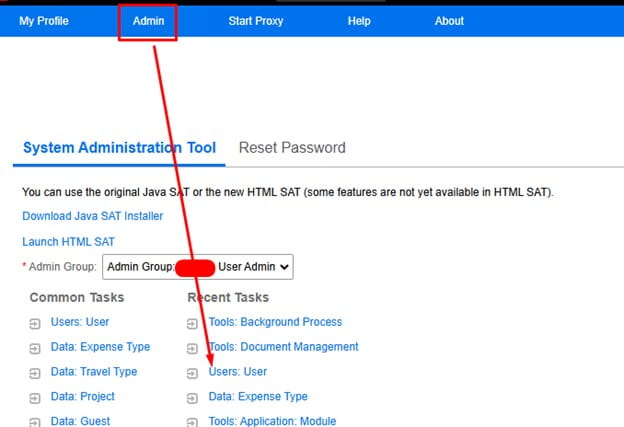
- Login to XM and view the user profile in XM (Admin rights required):
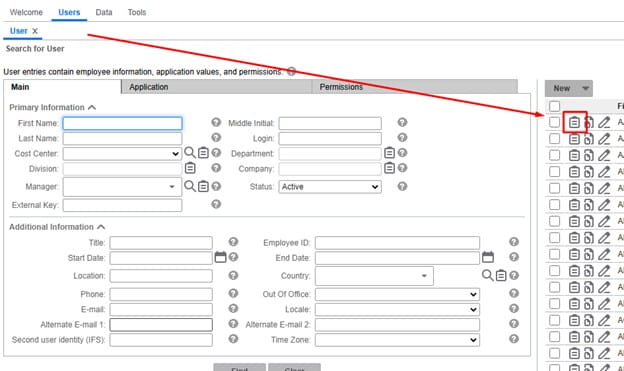
- Locate and view your user:
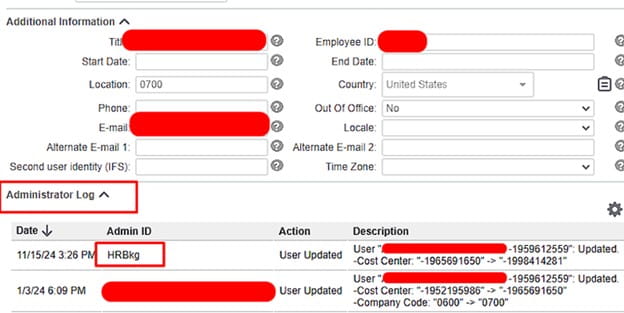
- View the Administration Log and figure out who or what process might be changing this:

- In this case we see the HRBkg process modifying this user. This can be bringing data in for your organizations HR application (Workday etc.).
You can consult Infor further to get more information on the process updating your XM Users (assuming it’s not a completely custom process). Nogalis also offers a team of managed service professionals to help support processes like Expense Management among other applications. We also support custom processes unlike Infor. Visit us at our contact page for more information: https://www.nogalis.com/support/

