
Seven Myths About Implementing ADFS For Infor Lawson
On March 1, 2019, Infor will no longer support LS/STS authentication configuration for Lawson applications. The Infor recommended configuration will be to use Active Directory Federation Services (ADFS) for Single Sign-On (SSO) authentication. To learn more about ADFS, check out our other articles on the topic:
- Five Things You Need to Know About Implementing ADFS For Your Infor Lawson Applications
- Other Authentication Options for Infor Lawson Applications
What is ADFS?
Active Directory Federation Services is a Single Sign-On service provided by Microsoft. It runs on Windows Server, and provides users with the ability to sign on with one set of credentials across applications.
How does ADFS work with Lawson?
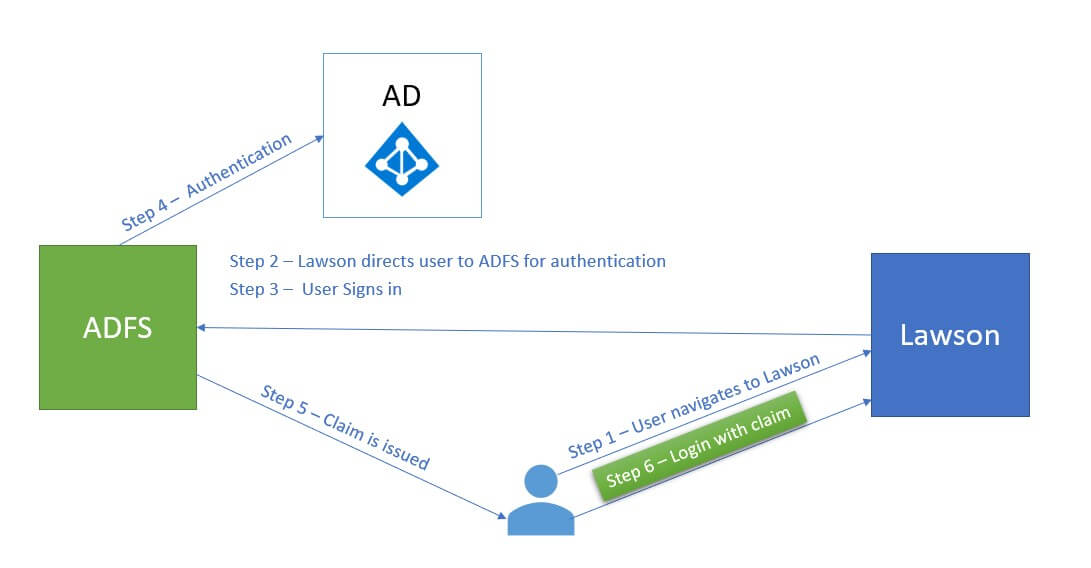
Why change our authentication method?
Although there will be some work up front to modify your configuration from LS/STS to ADFS, using ADFS for SSO authentication is actually beneficial to your organization. It is more secure because Infor applications will never have access to a user’s password. It is also a bit easier to maintain your Infor users in ADFS, in that you can enable/disable the users right within Windows instead of having to do it in Lawson Security. Additionally, implementing ADFS will open up other Microsoft security components, such as two-factor authentication.
Busting Myths
There are some common misconceptions revolving around the implementation of ADFS for your Infor Lawson application. Hopefully these explanations will help dispel the confusion.
MYTH: We can use our organization’s current ADFS installation
Infor Federation Services (IFS) must be installed on the same server as ADFS. So, you may need to have a dedicated server for ADFS for Lawson. Also, your Infor Lawson applications cannot be hosted on the same server as ADFS. If you are installing a new instance of ADFS, make sure that it is compatible with your current version of Active Directory
MYTH: We don’t need SSL to implement ADFS
ADFS requires all of your Infor Lawson applications to use SSL (Secure Socket Layer). You will need to select a Certificate Authority (CA), and install certificates at each web endpoint. If your current Lawson web applications are not using SSL, you will need to convert them before you begin the ADFS installation/configuration.
MYTH: Our organization has to begin using ADFS for everything
The ADFS implementation is limited to Lawson and does not need to be part of any other application in your organization. A Windows server will host ADFS solely for Lawson and can be segregated to just this specific use without affecting anything else within the organization.
MYTH: The change is transparent to users
The look & feel of your Lawson web applications will remain the same, but the way users log in will change. LS/STS username format is currently “username”. When you switch to ADFS, users will log in with format “username@domain.com”. Also, keep in mind that if you have to update to a compatible ESP in any of your applications, there may be some slight changes in what the users see on the forms they use. Make sure this is done well in advance so the ESP can be tested thoroughly.
MYTH: Infor won’t support us after March 1, 2019
As of March 1, 2019, Infor will no longer be releasing Lawson patches that take LS/STS authentication method into account. This doesn’t mean your current versions of Lawson applications will stop working if you fail to move to ADFS at this time. It just means that you won’t be able to upgrade past a specific ESP for each product (10.0.9 for Lawson). When Infor sunsets the product versions that allow LS/STS, you will then be on an unsupported product version. It is look like this will happen sometime early 2021.
MYTH: User maintenance in Lawson Security is going to change
ADFS is an Authentication Method, while Lawson Security is an Authorization Method. So, you will continue to use Lawson Security Administrator (LSA) or Infor Security Services (ISS) to maintain users and roles. The ADFS authentication will not impact these roles at all.
MYTH: We use IPA, so we will have to update Landmark too
Infor Lawson products are actually the only products that allow LS/STS authentication method. So, you will not need to make any updates to your Landmark products, including IPA.
Contact us when you are ready for your move to ADFS. Our expert installers at Nogalis can make the process simple and pain-free.
Retiring Lawson, PeopleSoft, or Oracle? APIX archives the entire application — every table, every year, attachments and security included — into your own AWS account in about 30 days, so you can decommission the legacy system and keep full access to the history.

