

844-NOGALIS (844-664-2547)
Nogalis, Inc.
  • Link to Facebook
  • Link to X
  • Link to LinkedIn
  • Link to Mail
  • Company
    • News, Events and Articles
    • About Us
  • Products
    • Infor Lawson Data Archive
    • PeopleSoft Data Archive
    • Oracle Data Archive
  • Services
    • Infor Lawson Support
    • Infor Lawson / CloudSuite Consulting
  • Education & Training
  • Support
  • Contact Us
  • Click to open the search input field Click to open the search input field Search
  • Menu Menu

How to Fix Lawson Backoffice Publish Issue

Articles, News

How to Fix Lawson Backoffice Publish Issue

This is a simple fix but sometimes hard to determine even if you’ve reviewed the Infor documentation.

So first lets make sure your FTP settings are setup correctly:
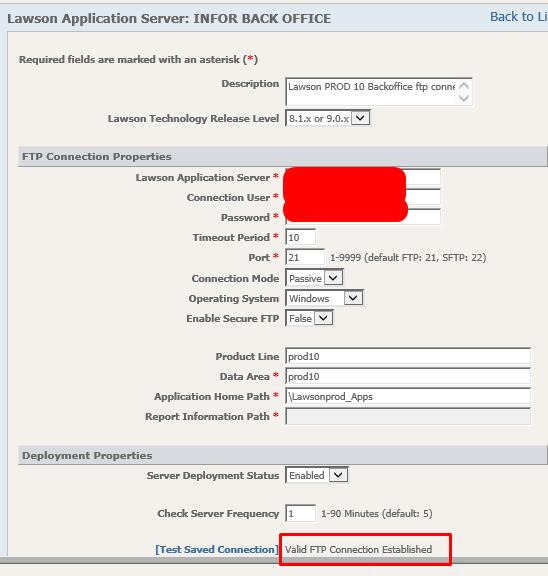
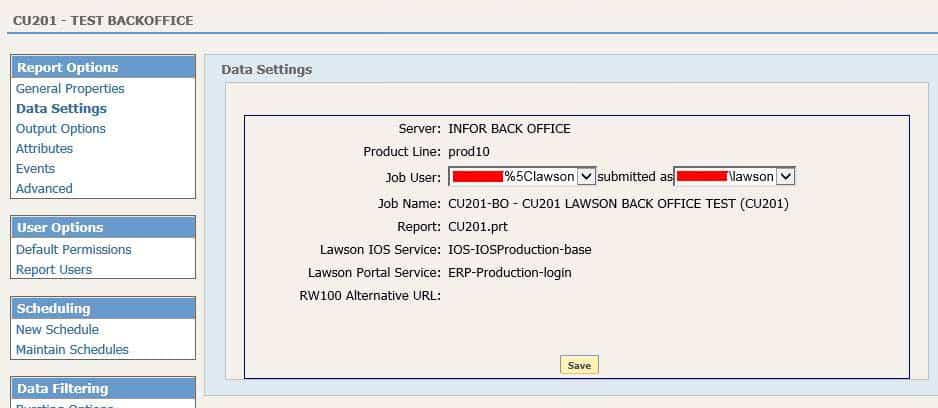
Lets assume you already published your report in LBI, for us we are doing CU201 for testing:
We run the job again so it will publish automatically via backoffice:
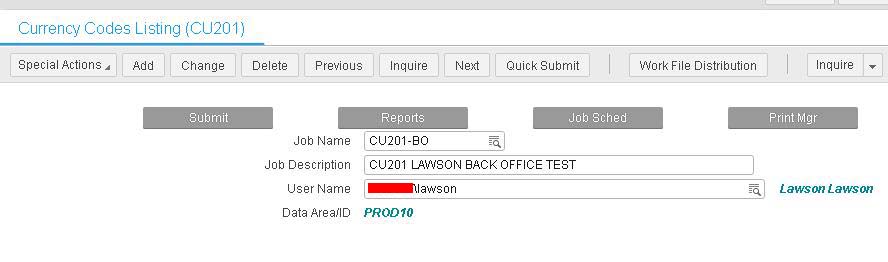
Problem:

The broadcast.csv and published.csv shows the CU201 report being transferred but the Instance is NOT being created.

Solution:

Give your Lawson Backoffice user write/read access to the LSF %LAWDIR% directory as well as FTP access to \Lawsonprod_Apps which most have setup already.
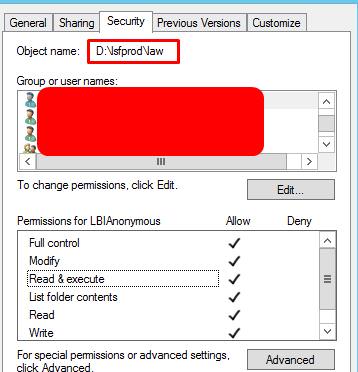
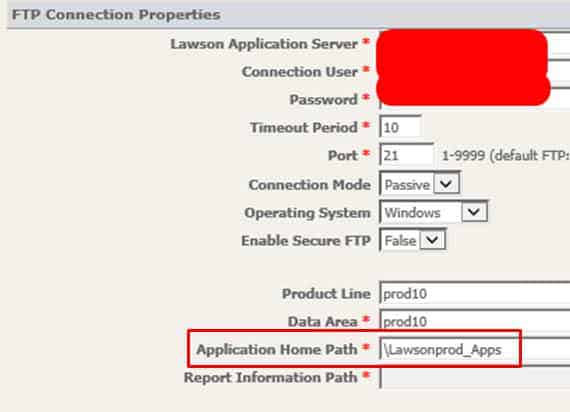
Results:

You should now see the instance created when you run the same CU201 job:

Retiring Lawson, PeopleSoft, or Oracle? APIX archives the entire application — every table, every year, attachments and security included — into your own AWS account in about 30 days, so you can decommission the legacy system and keep full access to the history.

See how the APIX ERP archive works →

03/01/2018
Share this entry
  • Share on Facebook
  • Share on X
  • Share on WhatsApp
  • Share on LinkedIn
  • Share on Reddit
  • Share by Mail
https://www.nogalis.com/wp-content/uploads/2018/02/How-to-Fix-Lawson-Backoffice-Publish-Issue.jpg 545 600 Angeli Menta https://www.nogalis.com/wp-content/uploads/2013/04/logo-with-slogan-good.png Angeli Menta2018-03-01 09:16:382019-05-20 13:11:53How to Fix Lawson Backoffice Publish Issue

LEGACY ERP DATA ARCHIVE SOLUTION


Discover how our clients are leveraging AWS services to archive their Legacy ERP data and provide ubiquitous access to users via a light-weight, secure, and read-only web interface. Secure, Fast, Reliable, and Cost Effective. That is the promise of APIX. Follow the link below to find out more and book a discovery call with our data archive specialist.

BOOK DEMO

© Copyright - Nogalis, Inc. 2026
  • Legal
  • Privacy
  • Contact Us
Link to: Bad File Status Link to: Bad File Status Bad File Status Link to: Apple to launch ‘technology enabled’ healthcare service Link to: Apple to launch ‘technology enabled’ healthcare service Apple to launch ‘technology enabled’ healthcare service
Scroll to top Scroll to top Scroll to top