
Configuring the Landmark Main Configuration Set
This article will demonstrate how to set up the most commonly-used Infor Lawson configurations in Landmark.
Infor delivers two configuration sets with Landmark: “main” and “system”. “Main” refers to the LSF environment, and “system” refers to the Landmark environment. It is best practices to use these configuration sets for the processes that access these systems.
Here are the most commonly used configurations for Lawson:
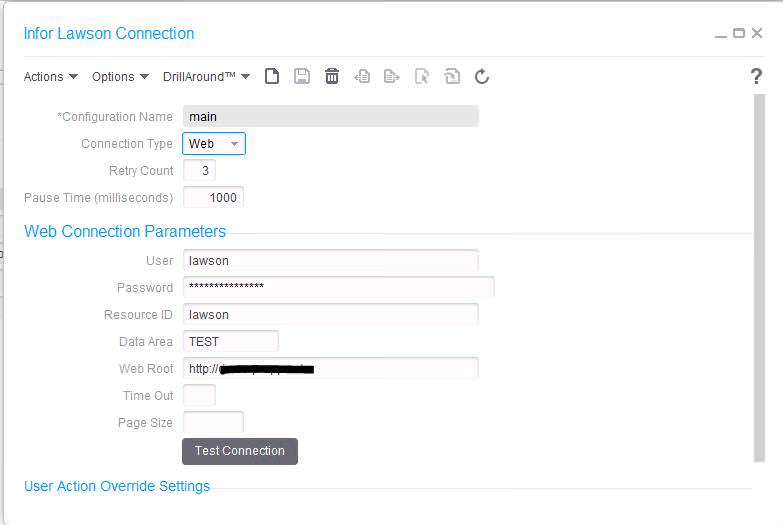
Infor Lawson
Used for web calls (DME/AGS) to Lawson, as well as Resource queries (Lawson Security)
- Infor recommends using Connection Type “Web”
- Retry Count – number of times IPA will retry the connection after a failed attempt
- Pause Time – Amount of time in milliseconds between each attempt to reconnect when web call fails
- User – the web user who has access to DME/AGS calls and/or Lawson Security
- Password – the web user’s password
- Data Area – the name of the data area being accessed in the LSF environment
- Web Root – https://servername.company.com
- Time Out – Number of seconds of attempting to connect after which a timeout occurs
- Page Size – The number of records returned in a DME query (blank means no limit)

File Access
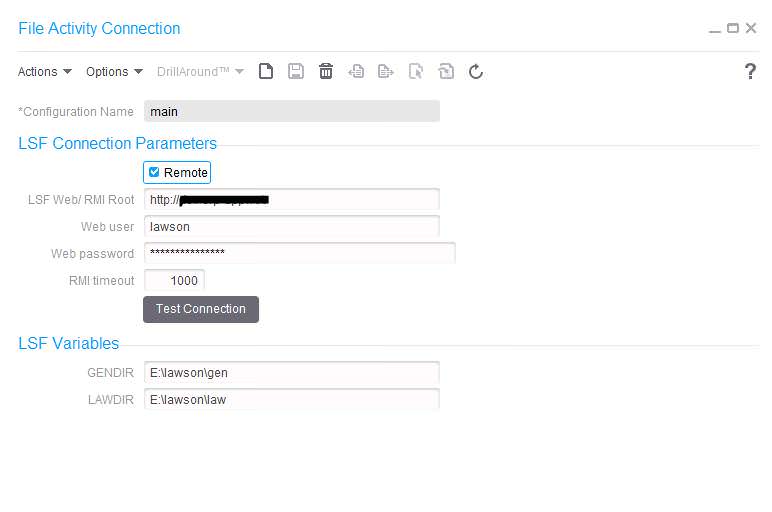
Used for file reads and manipulation on the LSF server
- Click “Remote” if LSF resides on a different server from Landmark
- LSF Web RMI Root – Same as Web Root in the Infor Lawson connection (https://server.company.com)
- Web user – the user who has directory access on the Lawson server
- Web password – the above user’s password
- RMI timeout – Number of milliseconds of attempting to connect after which a timeout occurs
- GENDIR – GENDIR environment variable value on the LSF server
- LAWDIR – LAWDIR environment variable value on the LSF server
JDBC
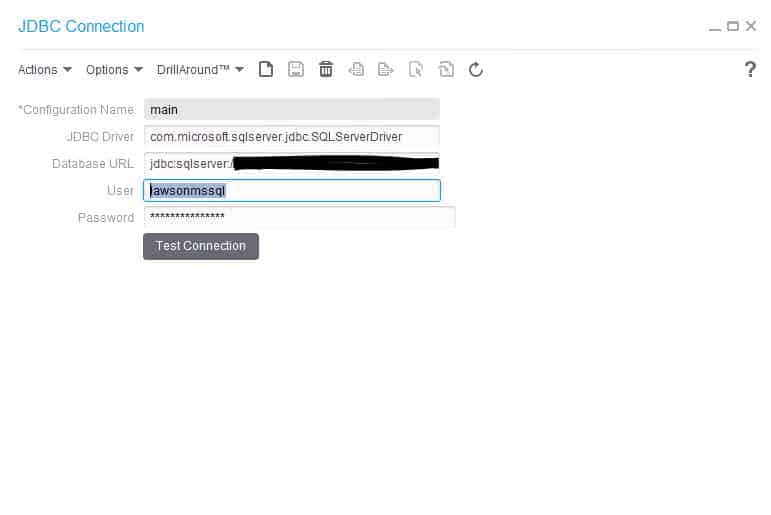
Used for SQL Queries and transactions
- JDBC Driver – the driver name used for JDBC
- Database URL – build the URL for your db
- Example: jdbc:sqlserver://servername\instancename:port;databasename=databasename
- Instance Name is optional
- Port is optional (default is 1433)
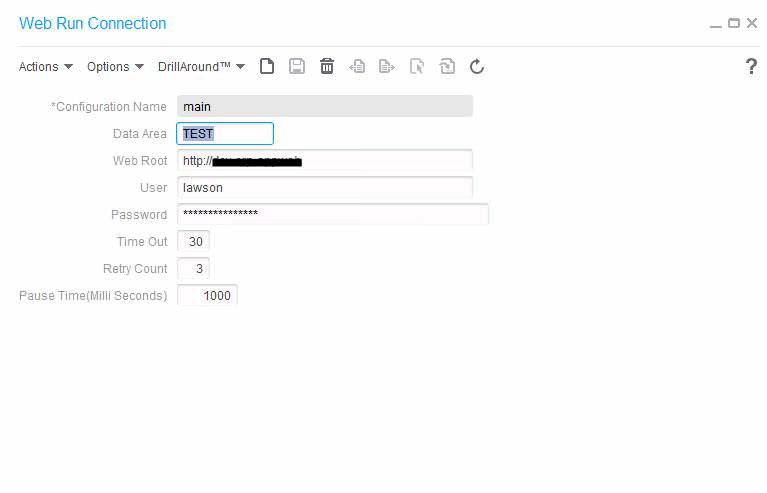
Web
Used for the Web Run process node (can be used to update and run batch jobs, etc.)
- Data Area – the data area to which you are connecting on LSF
- Web Root – https://servername.company.com
- User – the user who has access to web run calls
- Password – the above user’s password
- Time Out – Number of seconds of attempting to connect after which a timeout occurs
- Amount of time in milliseconds between each attempt to reconnect when web call fails
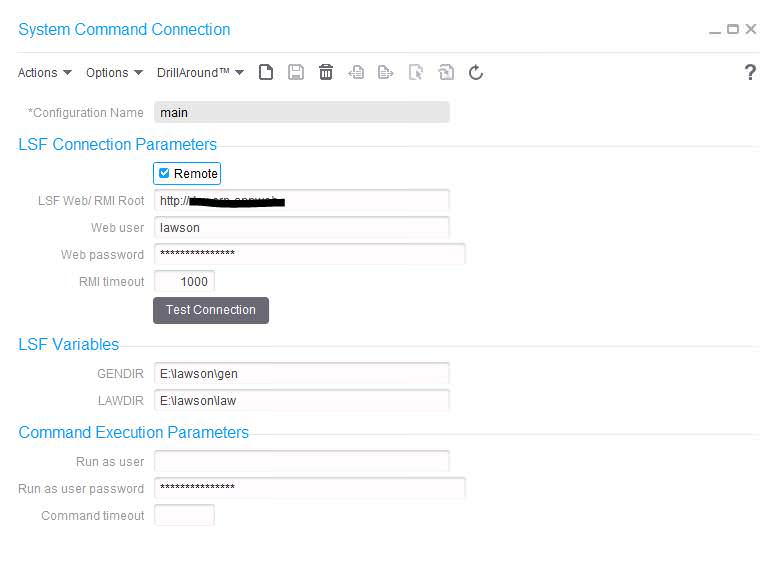
Sys Cmd
Used to run command line system commands, including Lawson commands such as importdb
- Check “Remote” is LSF resides on a separate server from Landmark
- LSF Web/RMI Root – https://server.company.com
- Web User – the user who has access to the LSF system
- Web password – Web User’s password
- RMI timeout – Number of milliseconds of attempting to connect after which a timeout occurs
- GENDIR – GENDIR on LSF system
- LAWDIR – LAWDIR on LSF system
- Run as user – the provide user credentials under which the command should run
- NOTE: Windows no longer allows cmd to be run as a different user, so command line will always be run under the user running the bpm service. This is most likely the system user, and as a result, that user will have to be added to Lawson security and given access to run Lawson commands (if that is how this node is used)
- Run as user password – above user’s password (see note above)
- Command timeout – Number of milliseconds of attempting to connect after which a timeout occurs

Retiring Lawson, PeopleSoft, or Oracle? APIX archives the entire application — every table, every year, attachments and security included — into your own AWS account in about 30 days, so you can decommission the legacy system and keep full access to the history.

