
How to transfer a user’s jobs from one productline to another using jobdump and jobload
Note: Though possible, I would not recommend using jobdump and jobload from one version of Lawson to another as fields may change. Use at your own risk.
For this article, we will be doing jobdump and jobload in v10 between Prod and Test ProductLine.
Here are the flags for jobdump:
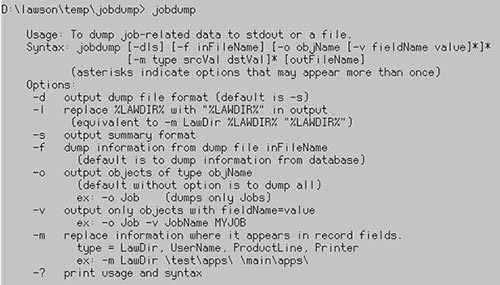
As you can see above, the flags give plenty of flexibility to specify what to dump. For this tutorial, we will be dumping all jobs for a single user from v10 Prod to v10 Test.
Step 1: First login to Lawson Interface Desktop, we’re logging into our v10 Prod server.
jobdump -d -o Job -v UserName LawsonPOBatch po_jobs.dmp
So we are essentially dumping all jobs –o Job for user –v UserName <YourUsersName> to a file called po_jobs.dmp that will be created in our current directory D:\lawson\temp\jobdump
We are dumping all jobs under our user: LawsonPOBatch. Make sure your user(s) exists in both ProductLines already.
Step 2: Transfer over your_dump_file.dmp file to other server via FTP etc.
Step 3: Login to your other servers productline, for us it will be v10 Test. Navigate through LID to your_dump_file.dmp file. This for us is: po_jobs.dmp
Here are the flags for jobload:
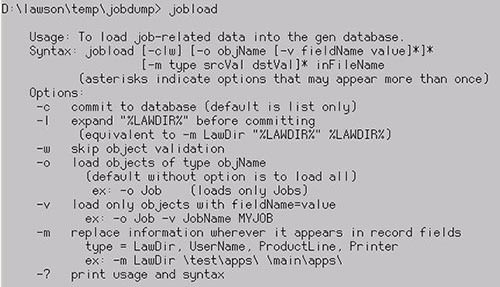
Since we dumped from Prod, we would be loading to Test. If it’s for the same user, no need to specify the username. If migrating to a new user with a different name, you can use a –m <source_user> <target_user>
We are transferring to the same user that is in both PROD and TEST so we don’t specify this.
Since we are transferring jobs from PROD to TEST you could specify this with –m ProductLine <SOURCE_PRODLINE> <TARGET_PRODLINE> (Must be in caps.)
Step 4: Run jobload in preview mode (without -c)
jobload -o Job -m ProductLine PROD TEST po_jobs.dmp
Or you could simply go into the .dmp file and change all instances of PROD to TEST (or whatever the name of your ProductLine is)
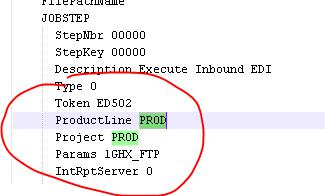
Then you could simply run
jobload -o Job po_jobs.dmp
This will run in preview mode. Run until you have no errors.
Step 5: Run in commit mode.
jobload -c -o Job -m ProductLine PROD TEST po_jobs.dmp
or
jobload -c -o Job po_jobs.dmp
if you edited the .dmp file manually.
If it was successful you’ll see the jobs being added.
Login to Lawson portal and verify those jobs got transferred over from that user.
Done!
Retiring Lawson, PeopleSoft, or Oracle? APIX archives the entire application — every table, every year, attachments and security included — into your own AWS account in about 30 days, so you can decommission the legacy system and keep full access to the history.

