
Turn user monitoring on in ISS
You can use the user monitoring administrative dashboard to turn monitoring on and off.
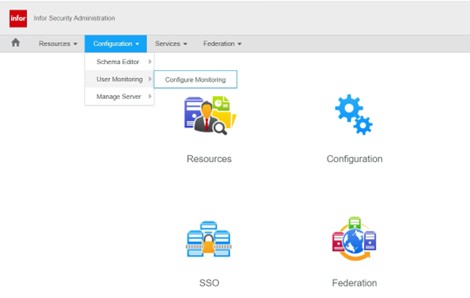
From the security administration dashboard, select Configuration and then under the User Monitoring group, select Configure Monitoring.
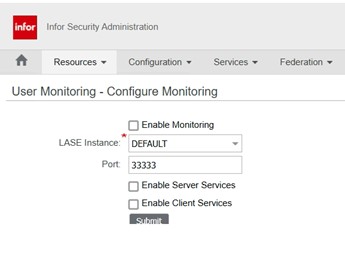
You will be on the User Monitoring – Configure Monitoring page.
- Enable or disable monitoring by clicking the Enable Monitoring checkbox. When this checkbox is checked, monitoring is enabled. When it is unchecked monitoring is disabled.

- Click Submit.
- Perform a full system stop and restart sequence to make the changes take effect.
- Stop your application server.
- Run the Infor stoplaw command
- Run the startlaw command
- Start your application server.
Retiring Lawson, PeopleSoft, or Oracle? APIX archives the entire application — every table, every year, attachments and security included — into your own AWS account in about 30 days, so you can decommission the legacy system and keep full access to the history.

